FAQ's - Smart ProjectorUpdated 9 months ago
How can I purchase the Smart Projector?
You can purchase the Smart Projector online here, call our sales team on (07) 3123 4715, or locate a store near you.
Where can I find the user manual for the Smart Projector?
You can find the user manual on our Support Portal.
What is the power input for the Smart Projector?
The Smart Projector operates on a 12V DC input and requires a minimum starting current of 6A.
What is the rated power consumption of the Smart Projector?
The Smart Projector consumes approximately 63W (4.9A) during operation.
Does the Smart Projector have the ability to operate on 240V AC?
Yes, the projector can be power by 240V AC. Please note that you must use the KickAss Adapter rated at 12V / 6A with a DC 5525 plug. Sold Separately.
How long is the adapter of the Smart Projector?
The adapter for the Smart Projector is 1.5m long.
What is the operating system of the Smart Projector?
The Smart Projector operates on the Android 12 Smart operating system.
What wireless features are available in the Smart Projector?
The Smart projector supports Wi-Fi 6 (2.4GHz & 5GHz) and Bluetooth 5.4 connectivity.
Does the Smart Projector have a mirroring function?
Yes, the Smart Projector supports screen mirroring for both iOS (iOSCast) and Android Devices (Miracast).
How can I set up the Smart Projector?
You can set up the Smart Projector in three ways:
- Freestanding on a stable surface.
- Mounted on a KickAss Tripod or any tripod with a threaded mount (sold separately).
- Ceiling-mounted using a compatible bracket with a ¼ inches mounting thread (not included).
What is the resolution of the Smart Projector?
The Smart Projector has a 1920 x 1080p Full HD resolution.
Does the Smart Projector support a 4K input?
Yes. The Smart Projector supports 4K input, but displays content at 1080p Full HD resolution.
How many lumens does the Smart Projector produce?
The Smart Projector has a brightness of 500 ANSI Lumens.
What ports does the Smart Projector have?
The Smart Projector includes these ports:
- 1 × HDMI 1.4 port
- 1 × USB 2.0 port
- 1 × 3.5mm audio output
- 1 × DC 5525 power input
Can I connect a Bluetooth speaker or wireless headphones to the Smart Projector?
Yes, you can connect devices such as the KickAss Bluetooth Soundbar. To enable Bluetooth on the Smart Projector, go to Settings > Bluetooth, then pair your preferred device.
Can I install apps on the Smart Projector?
Yes, absolutely. The Smart Projector comes with a range of pre-installed apps to get you started, including popular streaming services such as Netflix and YouTube.
You can easily expand your library by downloading additional apps via the built-in App Store on the projector.
What file formats does the Smart Projector support via USB?
The Smart Projector supports the following file formats:
Image: BMP, JPG, PNG, JPEG, GIF, TIF
Video: 3GP, F4V, M2TS, TP, MTS, TRP, M4V, ASF, RM, RMVB, TS, MP4, MKV, FLV, AVI, MPG, WMV, VOB, DAT, DIVX, MOV
Audio: MP3, WAV, WMA, MKA, FLAC, OGG, TIFF, M4A, AMR, MID
Document: PDF, DOC/DOCX, TXT
What is the projection size and distance of the Smart Projector?
Screen Size | Projection Distance (m) |
50 inches | 1.38 |
80 inches | 2.28 |
100 inches | 2.70 |
120 inches | 3.20 |
150 inches | 4.14 |
200 inches | 5.52 |
Does the Smart Projector have a screen saver wait time?
Yes. The Smart Projector’s screen saver wait time can be set to 1 minute, 5 minutes, 10 minutes, or Never.
Why can’t I adjust the digital zoom settings on the Smart Projector?
The digital zoom option of the Smart Projector is only available when Automatic Obstacle Avoidance and Automatic Screen Fit settings are disabled.
The screen mirroring is not working on the Smart Projector. What should I do?
Ensure that the Smart Projector and your mobile device are connected to the same Wi-Fi network. If they are, try restarting both your device and the Smart Projector, then repeat the screen mirroring steps.
Why can’t the Smart Projector read my USB stick?
Ensure that the USB stick is formatted to FAT32 or exFAT, as the Smart Projector does not support NTFS file formats. Also, check if the USB stick is not corrupted and is functioning properly.
Why is the HDMI input not working on my Smart Projector?
Ensure the HDMI cable is securely connected to both your device and the Smart Projector. Check that your device’s output source is set to HDMI, and inspect the cable for any signs of fraying or damage.
What are the power indicator statuses of the Smart Projector?
If the power button light on the Smart Projector is blue, the unit is powered on. If it’s red, the projector is connected to power but turned off. If there’s no light, the smart projector isn’t connected to a power source.
What are the dimensions and weight of the Smart Projector?
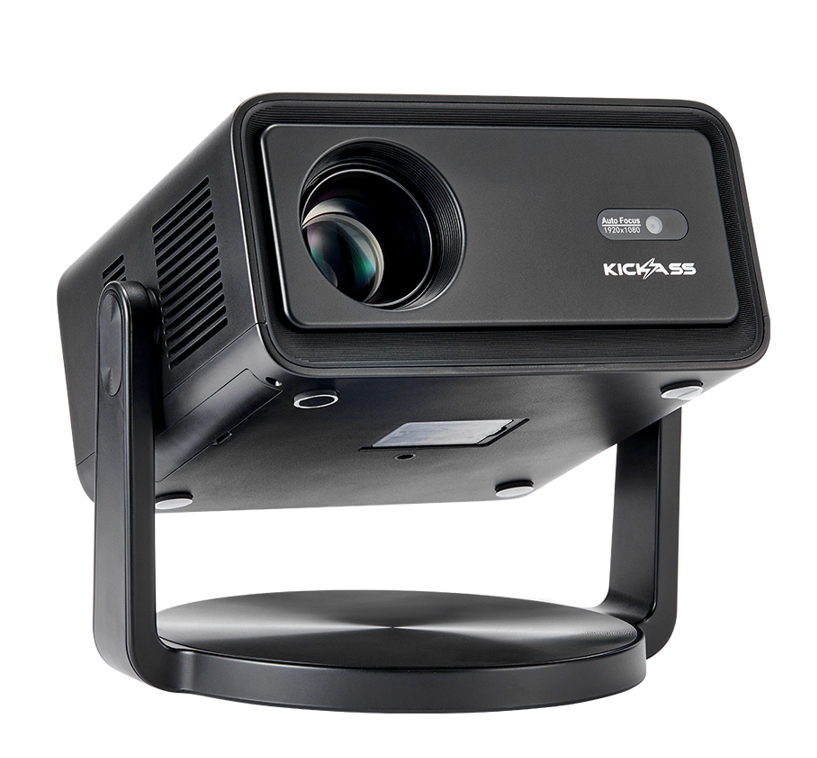
The Smart Projector measures 170mm (L) x 190mm (W) x 169mm (H)
Weight: 1.5kg.
SKU: KAODCP-SMART