
FAQ's - RGB Rock LightsUpdated 2 months ago

General Information & Purchasing
How can I purchase the KickAss RGB Rock Lights?
You can purchase the Outback RGB Rock Lights directly online through our website, call our sales team on (07) 3123 4715, or find a KickAss Store near you.
What comes included in the box?
The RGB Rock Lights includes:
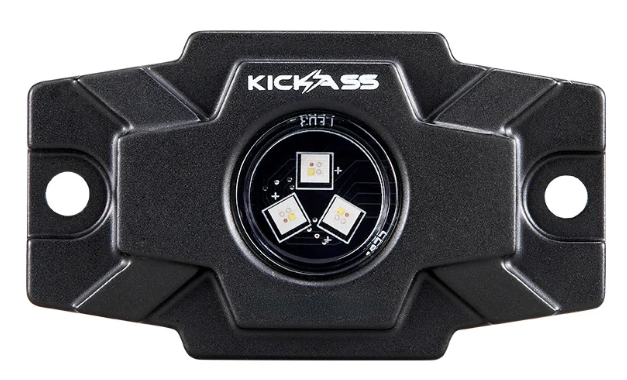
- 6 x RGBW Rock Lights
- 6 x Flat Silicone Mounting Pads
- 6 x 30° Angled Silicone Mounting Pads
- 4 x 3.5m Light Input Wires
- 2 x 5m Light Input Wires
- 1 x 2.8m Output Wire to Battery Terminals (with inline fuse)
- 1 x 3m Output Wire to On/Off Switch
- 12 x Bolts
- 12 x Nuts and Washers
- 12 x Self-tapping Screws
Where can I find the user manual?
You can view and download the official user manual here: KALTROCKRGB-6.
Features & Specifications
What makes these lights different from standard RGB rock lights?
The KickAss Rock Lights use RGBW technology, which means they have dedicated white LEDs in addition to the standard Red, Green, and Blue LEDs. Unlike standard RGB lights that create a simulated white by mixing colours, the dedicated white chip produces a cleaner, brighter, and more natural white light, making them more versatile for practical applications like campsite or work lighting.
Are the RGB Rock Lights fully waterproof?
Yes, they are built for harsh Australian conditions. The light pods have an ingress protection rating of IP68 and IP69K.
- IP68: This means they are fully sealed against dust and can be continuously submerged in water.
- IP69K: This is a higher rating that ensures protection against close-range, high-pressure, and high-temperature water jets. This makes them suitable for high-pressure washdowns after off-road use.
What are the full technical specifications?
RGB Rock Lights Specifications | |
|---|---|
| Input Voltage Range | 10V to 30V DC |
| Power Consumption | Up to 27.66W (Full System) |
| Luminous Flux | Up to 598 lumens (per light) |
| Colour Modes | Full RGB spectrum with dedicated white LED (RGBW) |
| Beam Angle | 120° Wide Flood Beam |
| Materials | Housing: Die-cast aluminium with UV-resistant coating Lens: UV-stabilized polycarbonate Mounting pad: Silicone with UV protection Fasteners: Black 316 stainless steel |
| Dimensions (per light) | 74.4 mm x 44.4 mm x 22.2 mm (LWH) |
| Product Weight | 2.4 kg per light |
Installation & Setup
Do I need to install a separate fuse?
For your safety and convenience, the kit comes with a pre-installed inline 5A blade fuse on the positive (red) power lead that connects to your battery. This protects the system from short circuits and overcurrent conditions.
How do I mount the rock lights?
First, choose between the Flat Pad (for flat surfaces) or the 30° Angled Pad.
- Position the light and pad, then mark the mounting holes and the central hole for the wire to pass through.
- Drill the pilot holes.
- Pass the light's wiring lead through the centre hole of the pad and your mounting surface.
- Secure the light using one of two methods:
- Bolts & Nuts (Recommended): Insert the bolts from the front and secure with the provided washers and nuts from the back. This is best for panels where you have rear access.
- Self-Tapping Screws: Drive the screws directly into a suitable metal surface. Ensure the material is thick enough for a secure fit.
What is the correct wiring sequence of the Rock Lights?
- Route the leads from each rock light to the central control box. Secure the cables away from heat sources (exhaust) and moving parts (suspension). Connect each lead to the control box via the waterproof DC barrel connectors.
- Wire the Dashboard Switch: Route the 3-metre switch wire from the control box into the vehicle cabin and connect it to your on/off switch.
- Connect to Power: Route the 2.8-metre terminal power wire from the control box to your 12V or 24V auxiliary battery. Connect the red ring terminal to the positive (+) terminal and the black ring terminal to the negative (-) terminal.
Operation & Control
How do I control the rock lights?
The lights are controlled using the "HappyLighting" mobile application, which connects to the control box via Bluetooth. First, ensure the system is powered on using your installed dashboard switch.
- Download App: In the iOS App Store or Google Play Store.
- Enable Bluetooth: Turn on Bluetooth in your smartphone's settings.
- Connect: Open the HappyLighting app. It will automatically scan for and connect to the rock lights' control box. Once connected, the app interface will display active control options.
What are the main functions of the HappyLighting app?
The HappyLighting app provides full control over the lighting system:
- Adjust Tab: Select any static colour from the colour wheel, choose the dedicated pure white mode, and adjust the overall brightness.
- Music Tab: Sync the lights to pulse and flash with music files stored locally on your phone.
- Mic Tab: Uses your phone's microphone to make the lights react to ambient sound, music, or voices.
- Style Tab: Choose from pre-programmed dynamic patterns like strobing, flashing, and gradual colour transitions. You can also control the speed of these effects.
- Timing Tab: Set automated schedules to turn the lights on or off at specific times.
Maintenance & Troubleshooting
The rock lights won't turn on. What should I check?
- Check the Fuse: Inspect the inline 5A blade fuse on the positive battery lead. Replace it if it is blown.
- Check Power & Connections: Ensure your dashboard switch is ON and that the ring terminals are securely fastened to your battery terminals.
- Check System Voltage: Verify your battery voltage is within the required 10V to 30V DC operating range.
The app won't connect to the Rock Lights. What should I do?
- Ensure Bluetooth is enabled on your smartphone.
- Confirm the rock lights are powered ON via the dashboard switch before opening the app.
- Pairing Method: Remember to connect via the app, not your phone's Bluetooth settings. If you paired it manually, "forget" the device in your Bluetooth menu and try connecting through the app again.
- If issues persist, try force-closing the app, restarting your phone, and then reopening the app.
How should I clean the RGB Rock Lights after an off-road trip?
The rock lights are rated IP69K and are safe for high-pressure washing. Hose off any mud, dirt, or dust with clean water. For the polycarbonate lenses, use a soft microfiber cloth with a mild soap and water solution to avoid scratches. Do not use abrasive pads or harsh chemical solvents,.
Note: After driving on beaches or in marine environments, always rinse the lights and mounting hardware with fresh water to prevent salt corrosion.
Ready to Light Up Your Rig?
With dedicated white light, full RGB control, and IP69K durability, the KickAss Outback Rock Lights are built for any adventure.
Purchase NowModel: KALTROCKRGB-6 | Outback Proof Gear