
FAQ's - RGB Pen TorchUpdated 2 months ago

General Information & Purchasing
How can I purchase the KickAss RGB Pen Torch?
You can purchase the RGB Pen Torch directly online through our website, call our sales team on (07) 3123 4715, or find a KickAss Store near you.
What comes included in the box?
Each KickAss RGB Pen Torch kit includes:
- 1 x KickAss RGB Pen Torch
- 1 x 80cm USB-C to USB-A Charging Cable
Where can I find the user manual?
You can view and download the official user manual here: KATORCHPEN
Features & Specifications
What are the main lighting modes?
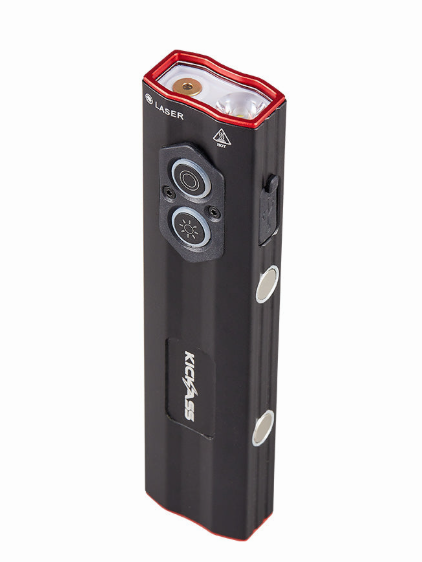
This versatile 4-in-1 torch combines multiple lighting functions into a single unit:
- Main Beam: A powerful forward-facing spotlight with high and low settings.
- Floodlight: A wide-angle white light on the side panel for broad area illumination.
- Red Laser: A precise red laser pointer for signalling and presentations.
- RGB Lighting: A multi-colour side light with four dynamic modes (revolving, colour-changing, strobe, and breathing).
How bright is the RGB Pen Torch?
The torch features a Turbo Mode that delivers a maximum output of 700 lumens. It also offers stepless dimming for both the main beam and the side floodlight, allowing you to select the perfect amount of light for any task.
Is the RGB Pen Torch rechargeable?
Yes. The RGB Pen Torch has an integrated 3.7V 1200mAh battery that recharges via the built-in USB-C port. A full charge takes approximately 3 hours and provides up to 12 hours of runtime, depending on the mode used.
What are the full technical specifications?
KickAss RGB Pen Torch Specifications | |
|---|---|
| Product Dimensions | 121 x 29.5 x 21.5 mm (LWH) |
| Product Weight | 116 g |
| Max Brightness | 700 lumens |
| Battery Capacity | 3.7V 1200mAh (built-in) |
| USB-C Input | 5V/1A (5W) |
| Approx. Charging Time | 3 hours |
| Mounting Options | Magnetic base, pocket clip, lanyard hole |
| Housing Material | 6063 Aluminium Alloy |
| Ingress Protection | IPX4 (Splash Resistant) |
Setup & Operation
How do I charge the RGB Pen Torch?
- Remove the protective cover from the USB-C input port.
- Using the included cable, connect the USB-C end to the torch's charging port.
- Connect the other end to a suitable power source (e.g., wall adapter, power bank, car charger).
- The side light button will illuminate red to indicate charging is in progress.
- When fully charged, the side light button will turn green.
Note: The torch can be used while it is charging.
How do I operate the main spotlight and laser?
Use the top button to control the forward-facing lights:
- Single Press: Cycles through Main Spotlight Low > Main Spotlight High > Red Laser > Off.
- Quick Double Press: Activates Turbo Mode (700 lumens) for 25-30 seconds before returning to the previous setting.
- Press & Hold: Activates smooth, stepless dimming for the main spotlight.
How do I operate the side floodlight and RGB lights?
Use the side button (with the sun icon) to control the side-panel lights:
- Single Press: Cycles through Side Floodlight Low > Side Floodlight High > Off.
- Quick Double Press: Activates the multi-colour RGB light system. Subsequent single clicks cycle through the four dynamic RGB modes.
- Press & Hold: Activates smooth, stepless dimming for the white side floodlight.
How can I mount the RGB Pen Torch for hands-free use?
The torch is designed with three hands-free options:
- Magnetic Base: A powerful magnet in the base allows it to securely attach to any flat ferrous metal surface, perfect for vehicle repairs.
- Pocket Clip: An integrated clip lets you attach it to a pocket, belt, or tool bag.
- Lanyard Hole: A dedicated hole allows you to attach a lanyard for quick access.
Maintenance & Troubleshooting
The RGB Pen Torch won't turn on. What should I do?
The most common reason is a depleted battery. Please connect the torch to a power source and allow it to fully charge. We recommend charging the torch every three months to avoid complete discharge over time.
The RGB Pen Torch isn't charging. What should I check?
- Ensure the USB-C cable is securely plugged into both the torch and a working power source.
- Verify that your wall adapter, car charger, or power bank is functioning correctly.
- Inspect the charging cable for any signs of damage, such as frayed wires. If damage is found, try using a different compatible USB-C cable.
Why did the light turn off when I tried to change modes?
The RGB Pen Torch has a smart power-saving feature. If the light remains on in any mode for longer than 5 seconds without a button being pressed, the next single press will turn the torch off completely instead of cycling to the next mode. To cycle through modes, press the button again within 5 seconds.
Need A Versatile Pocket Torch?
With a 700-lumen beam, magnetic mounting, RGB lighting and USB-C charging, this is the perfect everyday carry torch for any situation.
PURCHASE NOWModel: KATORCHPEN | Outback Proof Gear