
FAQ's - Rechargeable SUP PumpUpdated 20 days ago

General Information & Purchasing
How can I purchase the KickAss Rechargeable Electric SUP Pump?
You can purchase the SUP Pump directly online through our website, call our sales team on (07) 3123 4715, or find a KickAss Store near you.
What comes included in the box?
Each KickAss Rechargeable Electric SUP Pump kit includes:
- 1 x KickAss Rechargeable SUP Pump
- 1 x Carry Bag
- 1 x USB-C to USB-C Charging Cable
- 1 x Interchangeable Nozzle Set
- 1 x Air Hose
Where can I find the user manual?
You can view and download the official user manual here: KASUPPUMP
Features & Specifications
What are the key features of the Rechargeable SUP Pump?
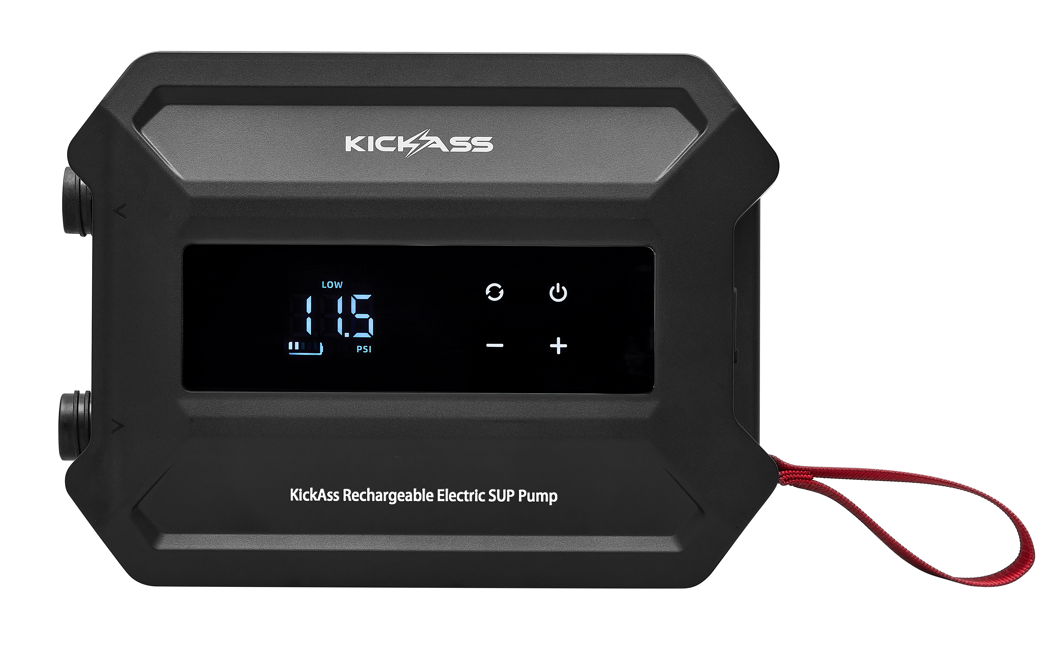
The Electric SUP Pump is engineered for convenience and performance:
- Two-Stage Inflation: A high-volume fan for initial filling and a high-pressure compressor to reach target PSI quickly.
- Automatic Shut-Off: Set your target pressure, and the pump automatically stops to prevent over-inflation.
- Inflate & Deflate: Features separate ports for both inflating your gear and deflating it for compact storage.
- Digital LED Display: Clearly shows real-time pressure and target settings.
What is the maximum pressure it can reach?
The Rechargeable SUP Pump delivers up to 20 PSI, making it suitable for high-pressure inflatables like stand-up paddleboards, inflatable kayaks, and heavy-duty watercraft.
How many SUPs can the Rechargeable SUP Pump inflate?
The 5200mAh battery can typically inflate 1-2 standard-sized stand-up paddleboards to 15 PSI on a single full charge. This can vary based on several factors:
- SUP Volume
- Target Pressure
- Ambient Temperature
What are the full technical specifications?
Rechargeable SUP Pump Specifications | |
|---|---|
| Product Dimensions | 22.1 cm (L) x 16.5 cm (W) x 8.1 cm (H) |
| Product Weight | 1.63 kg |
| Pressure Control Accuracy | ±0.2 PSI |
| Inflation System | Dual-stage: Fan (430L/min) with <0.8 PSI Compressor: (120L/min) with >0.8 PSI |
| Max Rated Power | 240W |
| USB-C Input / Output | Up to 30W |
Setup & Operation
How do I charge the Rechargeable SUP Pump?
Note: please fully charge the pump before its first use.
- Open the protective rubber cover to access the USB-C port.
- Connect the included USB-C cable to the pump and the other end to a suitable power source.
- Monitor the LED display for charging progress.
- Once fully charged (displaying 5 bars) unplug the cable and securely close the rubber port cover.
For long-term storage, recharge the battery every 3 months to maintain its health.
How do I inflate my stand-up paddleboard (SUP)?
- Connect the high-pressure hose to the Inflation Port (>) by screwing the hose clockwise onto the male thread.
- Attach the #1 adapter to the other end of the air hose, followed by #2 adapter.
- Choose the correct nozzle attachment for the equipment you are inflating and attach it to the #2 adapter.
- Power On: Press the Power Button to activate the LED screen.
- Press and hold the UNIT button to toggle between PSI or BAR. Press the UNIT button to change the function between Auto > Low > High
- Set Pressure: Use the Increase/Decrease buttons to set the target pressure required for your board.
- Start Inflation: Connect the nozzle to your board and press the Power Button again to start. The pump will run through its two stages and automatically shut off when the target pressure is reached.
How do I use the deflation function of the Rechargeable SUP Pump?
- Connect the hose to the Deflation Port (<).
- Attach the correct nozzle for your equipment to the other end of the hose.
- Power On: Press the Power Button to activate the screen.
- Start Deflation: Connect the nozzle to your equipment and press the Power Button to begin.
- Monitor and Stop: The pump will not auto-shutoff during deflation. Once all the air is removed, press the Power Button to stop the pump, then disconnect the hose.
Maintenance & Troubleshooting
What is the maximum continuous run time of the Rechargeable SUP Pump?
To prevent thermal overload, limit continuous operation to a maximum of 20 minutes. After a heavy inflation cycle, allow the pump to cool for 10-15 minutes before its next use.
My Rechargeable SUP Pump won't turn on. What should I check?
The most common cause is a depleted battery. Connect the pump to a power source using the supplied USB-C cable and allow it to charge fully before trying to turn it on again.
Why does the Rechargeable SUP Pump stop before reaching the target pressure?
This may be due to the pump’s built-in thermal protection. Continuous operation for around 20 minutes or use in ambient temperatures above 40°C may cause the pump to automatically shut down to prevent overheating.
Allow the pump to cool for 10–15 minutes before using it again.
What should I do if the Rechargeable SUP Pump gets wet?
WARNING: Do not power on the device if water has entered the ports or housing.
The Rechargeable SUP pump is not waterproof. If it is accidentally exposed to water, place the unit in a warm, dry environment for at least 3 days to allow all internal components to dry out completely before attempting to charge it or turn it back on.
Ready to Inflate Faster?
Inflate your SUP quickly and easily with the KickAss Rechargeable SUP Pump, featuring dual-stage inflation and automatic shut-off.
Purchase NowModel: KASUPPUMP | Outback Proof Gear
Model: KASUPPUMP | Outback Proof Gear