
FAQ's - KickCharge 3000Updated 2 months ago
How can I purchase the KickCharge 3000?
You can purchase the KickCharge 3000 online here, call our sales team on (07) 3123 4715, or locate a store near you.
Where can I find the user manual for the KickCharge 3000?
You can find the user manual on our Support Portal.
What is the battery capacity of the KickCharge 3000?
The built-in lithium battery in the KickCharge 3000 has a capacity of 200Ah at 12.8V.
Does the KickCharge 3000 have a Bluetooth with an app?
Yes. The KickCharge 3000 features built-in Bluetooth connectivity, allowing you to manage and monitor your power station remotely via the SmartLife- Smart Living Mobile App. You can view real-time data such as battery level, input and output power, and charging status.
How many outputs does the KickCharge 3000 have?
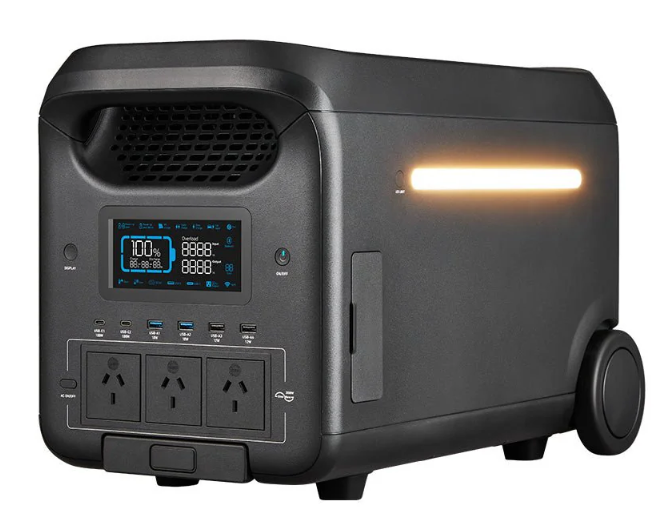
The KickCharge 3000 features multiple output ports, allowing you to power and charge several devices at the same time:
3 x AC Sockets | 230V 50Hz Pure sine wave |
Mini Anderson | 12.6V, 30A (360W) |
Cigarette Socket | 12V, 10A (120W) |
2 x USB-C QC 3.0 | 100W max |
2 x USB-A QC 3.0 | 18W max |
2 x USB-A | 12W max |
2 x DC5521 | 12V, 3A (60W) |
How can I charge the KickCharge 3000?
The KickCharge 3000 can be charged using three different power sources:
240V AC main power
Solar panels (13V-50V VoC / 12A max)
Vehicle Charging (12V / 8A max)
Does the KickCharge 3000 support dual-channel charging?
Yes. The KickCharge 3000 supports dual-channel charging via AC and solar, delivering up to 2700W of total input when Turbo Boost mode is activated. This allows the unit to charge from 0–80% in under an hour in ideal charging conditions.
Do I need to purchase and inverter separately to pair with the KickCharge 3000?
No, you don't need a separate inverter as the KickCharge 3000 has a built-in 3000W pure sine wave inverter.
How do I turn the KickCharge 3000 on and off?
Quick-press the power button to turn the KickCharge 3000 on, and press and hold the power button at least 3 seconds to turn it off.
What is the automatic timeout of the KickCharge 3000?
The automatic timeout feature of the KickCharge 3000 turns off all outputs when it detects a power draw of 0.5 W or less for one hour, preventing unnecessary power consumption from small loads.
Why are the DC outputs not working on my KickCharge 3000?
To use any DC output of the KickCharge 3000, press the DC power button and ensure the DC icon is illuminated on the display.
Does the KickCharge 3000 have an LED light?
Yes, the KickCharge 3000 has an LED light with a 5W output.
How difficult is it to transport the KickCharge 3000?
The KickCharge 3000 features built-in wheels and a pull-out handle, making it easy to move around. Its portable design allows you to conveniently roll the unit wherever power is needed, whether at home, on-site, or outdoors.
The KickCharge 3000 is powered on, but nothing is showing on the display screen. What should I do?
If the power button indicator is illuminated but the display screen is blank, simply press the Display button to wake the screen on.
What are the lengths of the included cables for the KickCharge 3000?
The KickCharge 3000 comes with four cables:
- 12AWG DC 7909 to Cigarette Lighter Cable – 1 metre
- 30A 12AWG Mini Anderson to Anderson Cable – 1 metre
- 10AWG DC 7909 to Anderson Solar Charging Cable – 1 metre
- AC Input Cable – 2 metres
How much does the KickCharge 3000 weigh?
The KickCharge 3000 weighs approximately 36kg.
What are the dimensions of the KickCharge 3000?
The dimensions of the KickCharge 3000 are 536mm (L) x 303mm (W) x 343mm (H)
SKU: KAPHUB-3000