
FAQ's - KickCharge 1200 MKIIUpdated 3 months ago
How can I purchase the KickCharge 1200 MKII?
You can purchase the KickCharge 1200 MKII online here, call our sales team on (07) 3123 4715, or locate a store near you.
Where can I find the user manual for the KickCharge MKII?
You can find the user manual on our Support Portal.
What is the battery capacity of the KickCharge 1200 MKII?
The built-in lithium battery in the KickCharge 1200 MKII has a capacity of 87.5Ah at 12.8V.
How many output charging ports does the KickCharge 1200 MKII have?
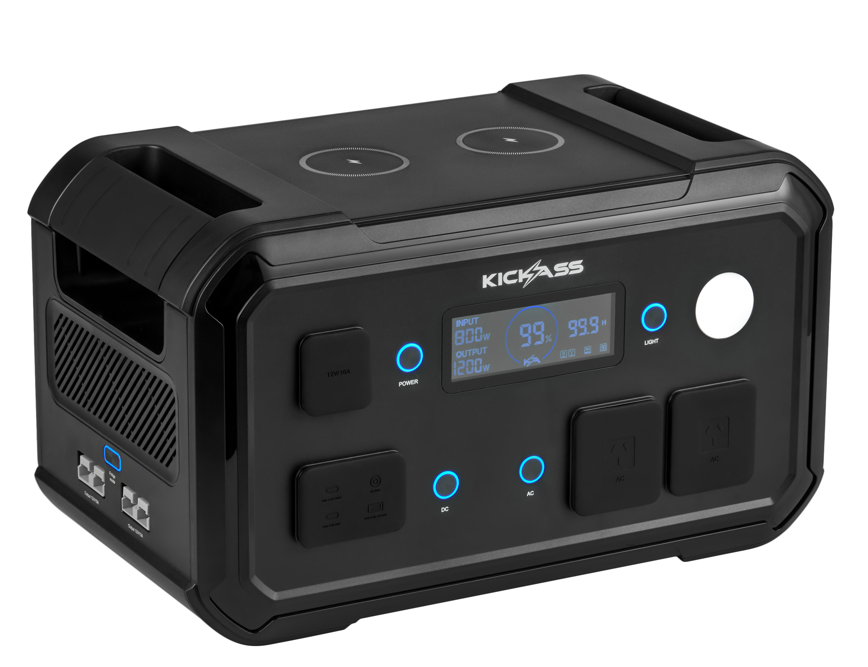
The KickCharge 1200 MKII features multiple output ports, allowing you to charge multiple devices simultaneously. It includes:
- 2 x AC Output
- 2 x 12V/15A Anderson Sockets (180W max)
- 1 x 12V/10A Cigarette Socket (120W max)
- 1 x USB-C PD 3.1 (140W)
- 1 x USB-C PD 3.0 (60W)
- 1 x USB-A PD 3.0 (22W)
- 1 x DC5521 Socket (5A / 60W)
- 2 x Wireless Charging Pads (10W max each socket)
How can I charge the KickCharge 1200 MKII?
The KickCharge 1200 MKII can be charged using three different power sources:
240V AC mains power (up to 800W)
Solar panels (12V-58V VoC / 12A max)
Vehicle Charging (12V / 8A)
Can I charge the KickCharge 1200 MKII via AC input and Solar input simultaneously?
Yes. The KickCharge 1200 MKII supports simultaneous AC and solar charging, with a combined maximum charging rate of up to 800W.
Do I need to purchase and inverter separately to pair with the KickCharge 1200 MKII?
No, you don't need a separate inverter as the KickCharge 1200 MKII has a built-in 1200W pure sine wave inverter.
Does the KickCharge 1200 MKII have a carry bag?
Yes. For added protection and easier transport, the KickCharge 1200 MKII Carry Bag can be purchased separately.
How do I turn the KickCharge 1200 MKII on and off?
Quick-press the power button to turn the KickCharge 1200 MKII on, and press and hold the power button to turn it off.
What is the automatic timeout of the KickCharge 1200 MKII?
The automatic timeout feature of the KickCharge 1200 MKII turns off all outputs when it does not detect load above 0.5W for one hour, preventing unnecessary power consumption from small loads.
Does the KickCharge 1200 MKII have charge and discharge indicators?
The KickCharge 1200 MKII displays a green arrow-up icon when charging and a red arrow-down icon when discharging.
What is the Fridge Mode on the KickCharge 1200 MKII?
When Fridge Mode is active on the KickCharge 1200 MKII, it disables the automatic timeout feature for both Anderson input sockets.
Why are the DC outputs (USB, DC5521, Anderson, wireless charging) not functioning on my KickCharge 1200 MKII?
To use any DC output on the KickCharge 1200 MKII , press the DC power button and ensure the DC icon is displayed on the LCD.
Does the KickCharge 1200 MKII have an LED light?
Yes, the KickCharge 1200 MKII has an LED light with a 5W output.
What are the key differences between the original KickCharge 1200 and the MKII version?
Original 1200 | MKII 1200 | |
Battery Capacity | 1008Wh | 1120Wh |
AC Charging Max | 500W | 800W |
Wireless Charging Pads | 1 x 10W | 2 x 10W |
USB-C Output Max | 100W | 140W |
What voltages does the KickCharge 1200 MKII support on the USB-C PD 3.1 port?
The KickCharge 1200 MKII supports USB-C PD 3.1 at 5V, 9V, 12V, 15V, 20V and 28V, with a maximum output of 140W.
What voltages does the KickCharge 1200 MKII support on the USB-C PD 3.0 port?
The KickCharge 1200 MKII supports USB-C PD 3.0 at 5V, 9V, 12V, 15V, and 20V, with a maximum output of 60W.
What voltages does the KickCharge 1200 MKII support on the USB-A QC 3.0 port?
The KickCharge 1200 MKII supports USB-A QC 3.0 at 5V, 9V, and 12V, with a maximum output of 22W.
What are the lengths of the included cables for the KickCharge 1200 MKII?
All included cables for the KickCharge 1200 MKII are 1.5 metres long.
How much does the KickCharge 1200 MKII weigh?
The KickCharge unit weighs approximately 15kg.
What are the dimensions of the KickCharge 1200h MKII?
The dimensions are 450mm (L) x 265mm (W) x 300mm (H)
SKU: KAPHUB-1200-MKII