
FAQ's - KickAss 30V Power Cable for Starlink MiniUpdated 3 months ago

General Information & Purchasing
How can I purchase the KickAss 30V Power Cable for Starlink Mini?
You can purchase the KickAss Heavy-Duty 12V/24V to 30V Anderson Power Cable for Starlink Mini directly online through our website, call our sales team on (07) 3123 4715, or find a KickAss Store near you.
What comes included in the box?
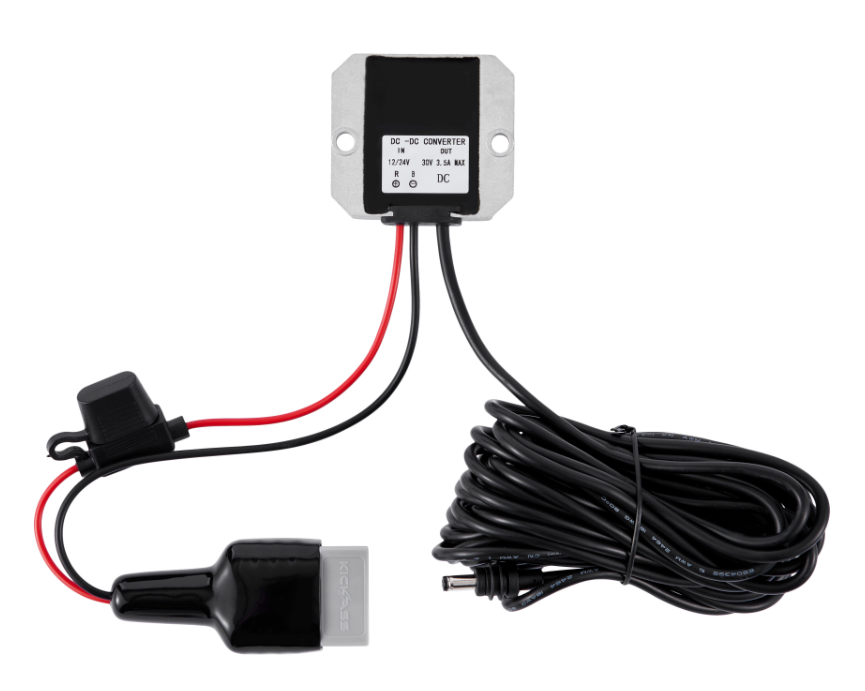
The package includes:
- 1 x KickAss Heavy-Duty 12V/24V to 30V Anderson Power Cable for Starlink Mini
Features & Technical Specifications
What are the key features of the 30V Power Cable for Starlink Mini?
This cable is purpose-built to reliably power your Starlink Mini from any 12V or 24V setup:
- Wide Input Voltage Range: Compatible with 10V-28V DC power sources, making it perfect for vehicle batteries, dual battery systems, and portable power stations.
- Regulated 30V Output: Features an integrated DC-DC converter that delivers a stable, regulated 30V output, precisely matching the Starlink Mini's power requirements for safe and reliable performance.
- Extra-Long Cable: A generous 7-metre length provides flexibility in positioning your Starlink Mini dish for the best possible satellite signal, away from your vehicle or power source.
- Built-In Fuse Protection: An integrated 15A blade fuse safeguards your Starlink Mini and your vehicle's electrical system against overloads and short circuits.
What are the full technical specifications?
KickAss Starlink Mini Power Cable Specifications | |
|---|---|
| Product SKU | KAAnd-STLMINI |
| Input Voltage | 10V – 28V DC |
| Output Voltage | 30V DC (Regulated) |
| Max Output Power | 100W (Nominal) |
| Max Output Current | 3.5A |
| Cable Length | 7.5m (Total: 7m + 0.5m) |
| Wire Gauge | 18AWG |
| Input Connector | Anderson Style Plug |
| Output Connector | Starlink Mini Barrel-Style Connector |
| Fuse Protection | 15A Blade Fuse (Inline) |
Can I use this cable with devices other than the Starlink Mini?
No. This cable is designed exclusively for the Starlink Mini.
The internal DC-DC converter steps up the input voltage to a specific, regulated 30V DC output. Connecting this cable to any other device, especially those designed for 12V, will supply incorrect voltage and will likely cause permanent damage to that device.
Setup & Operation
How do I connect the 30V Power Cable to my Starlink Mini?
Installation is a simple plug-and-play process:
- Ensure your 12V or 24V power source (e.g., battery box, power station) is switched on and has sufficient charge.
- Connect the Anderson plug end of the cable to a compatible Anderson socket on your power source.
- Connect the barrel-style plug at the other end of the cable directly to the power input port on your Starlink Mini dish.
- Your Starlink Mini should now power on.
What kind of power sources can I use?
This cable is compatible with any stable DC power source that provides a voltage between 10V and 28V and can supply at least 100W of power. This includes:
- Dual Battery Systems in 4WDs and vans
- Portable Lithium Power Stations (e.g., KickAss KickCharge series)
- 12V Portable Battery Boxes with Anderson outputs
- Caravan and camper trailer house battery systems
Maintenance & Troubleshooting
How do I replace the fuse of the 30V Power Cable?
- Locate the inline fuse holder near the Anderson plug end of the cable.
- Open the protective cap or housing of the fuse holder.
- Carefully pull out the existing blade fuse.
- Replace it with a new standard 15A automotive blade fuse.
- Securely close the fuse holder to ensure it remains weather-resistant.
Power Your Starlink Mini Off-Grid
Stay connected wherever you roam. This heavy-duty cable is the perfect solution for running your Starlink Mini from any 12V or 24V setup.
Purchase NowModel: KAAnd-STLMINI | Outback Proof Gear