
FAQ's - Battery Box with 25A BT DCDC ChargerUpdated 7 months ago
How can I purchase the Battery Box with 25A BT DCDC Charger?
You can purchase the Battery Box with 25A BT DCDC Charger online here, call our sales team on (07) 3123 4715, or locate a store near you.
Where can I find the user manual for the Battery Box with 25A BT DCDC Charger?
You can find the user manual on our Support Portal.
How many inputs and outputs does the Battery Box with 25A BT DCDC Charger have?
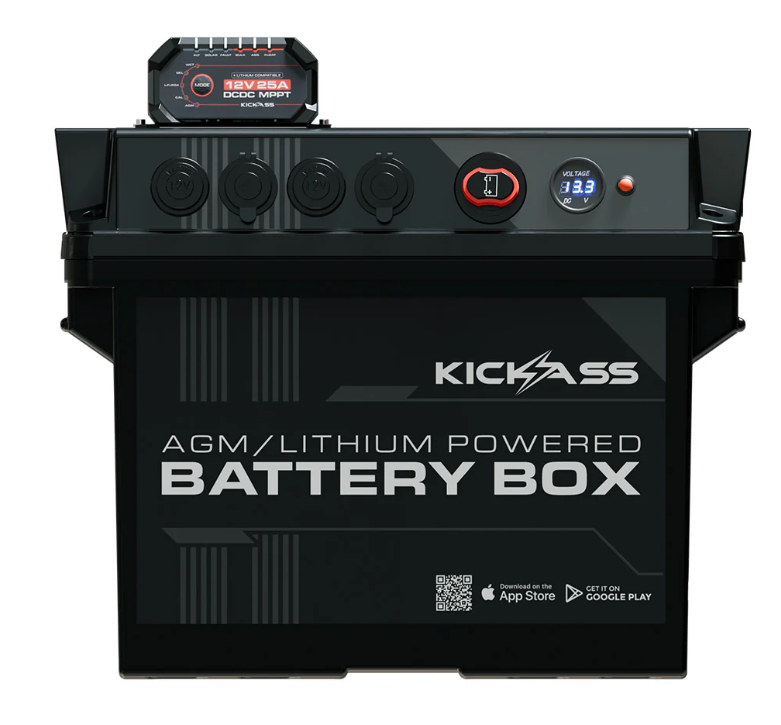
2 x Dual Sets of Anderson Input/Outputs (4 total) | 50A shared circuit breaker |
1 x Three-Pin Anderson Socket (Input/Output) | 120A maximum |
3 x Cigarette Sockets (Output) | 10A max per socket |
1 x USB-C QC 3.0 (Output) | 18W |
1 x USB-A (Output) | 12W |
Does the Battery Box with 25A BT DCDC Charger have a mobile app?
Yes, you can download the KA CHARGE Mobile App from the Apple App Store or Google Play Store to monitor and manage your the DCDC Charger.
How do you secure the Battery Box with 25A BT DCDC Charger in a vehicle?
The Battery Box with 25A BT DCDC Charger is compatible with the KickAss Battery Box Tray available as an optional accessory, and is designed to provide added stability and protection during transport.
How can I charge the Battery Box with 25A BT DCDC Charger?
You can charge the Battery Box with 25A BT DCDC Charger using:
- Vehicle alternator
- ACDC Charger (always check max charging input of your battery)
- Solar
How do I connect my solar panel to the Battery Box with 25A BT DCDC Charger?
You can connect your solar panel to the battery box in two different ways:
1. Connect an unregulated solar panel to the designated solar input Anderson to utilise the DCDC chargers inbuilt MPPT regulator. Just ensure your solar panel has a Voc rating of less than 32V.
2. You can connect a solar panel to an external solar regulator, then connect the regulator output to any of the standard Anderson input/output ports on the battery box.
Note: Do not run solar through two regulators. A regulated solar panel must not be connected to the solar input Anderson plug.
Does the master switch of the Battery Box with 25A BT DCDC Charger disconnect everything?
The master switch of the Battery Box with 25A BT DCDC Charger disconnects all outputs except the high-power Anderson socket and the LCD screen.
Why have the Anderson sockets, cigarette sockets, or USB ports on the Battery Box with 25A BT DCDC Charger suddenly stopped working?
Ensure the isolator switch is in the ON position. Check that the total load does not exceed 50A across the Anderson sockets or 10A per cigarette/USB socket. If the system is overloaded, disconnect some devices and reduce the load. The circuit breaker will automatically reset once the excess current is removed.
What is the maximum battery weight supported by the Battery Box with 25A BT DCDC Charger?
The Battery Box with 25A BT DCDC Charger can accommodate a battery with a maximum weight of 35 kg.
What type of batteries can installed in the Battery Box with 25A BT DCDC Charger?
The Battery Box with 25A BT DCDC Charger supports 12V AGM, Lithium, Gel, Calcium, and Wet battery types.
What size battery will fit in the 25A Battery Box with 25A BT DCDC Charger?
The internal battery dimensions of the Battery Box with 25A BT DCDC Charger (including the silicone mat) are 340mm (L) × 185mm (W) × 235mm (H).
How much does the Battery Box with 25A BT DCDC Charger weigh?
The Battery Box with 25A BT DCDC Charger weighs 6kg.
What are the dimensions of the Battery Box with 25A BT DCDC Charger?
The dimensions of the Battery Box with 25A BT DCDC Charger are 430mm (L) x 260mm (W) x 398mm (H)
SKU: KAJBBOX25A