
FAQ's - 350W Sandwich PressUpdated 18 days ago

General Information & Purchasing
How can I purchase the KickAss 350W Sandwich Press?
You can purchase the 12V Portable 350W Sandwich Press directly online through our website, call our sales team on (07) 3123 4715, or find a KickAss Store near you.
What comes included in the box?
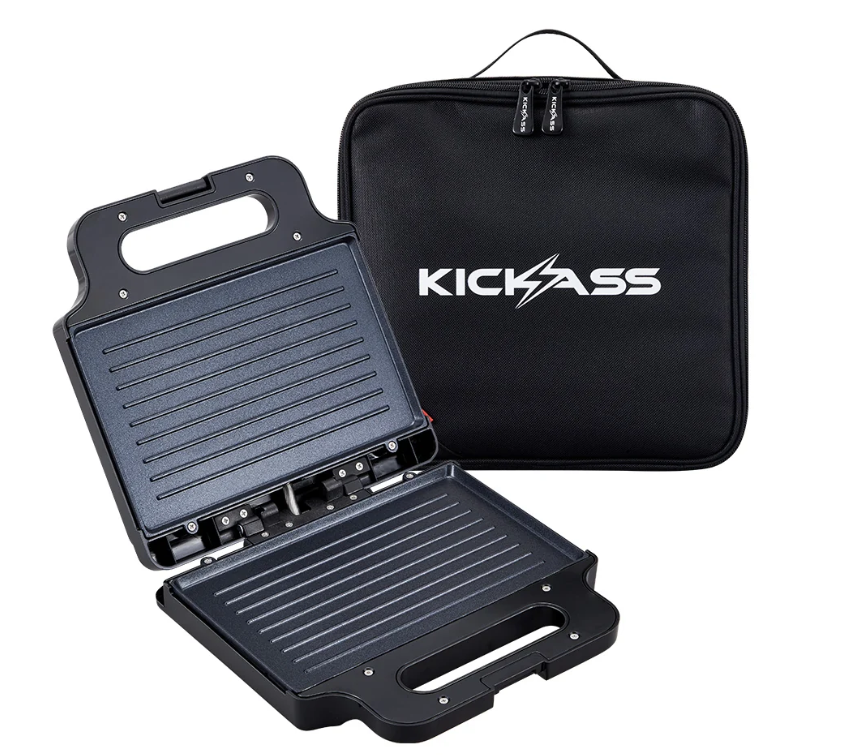
Each KickAss 12V Portable Sandwich Press kit includes:
- 1 x Portable Sandwich Press (with pre-wired 50A Anderson-style cable & integrated 40A fuse)
- 1 x Carry Bag
Where can I find the user manual?
You can view and download the official user manual here: KASWICHPRESS-350W
What are the key features of the 350W Sandwich Press?
- Dual Function: Opens flat 180 degrees to double as a compact camp grill for bacon, eggs, or vegetables.
- Powerful Heating: An efficient 350W element heats quickly for faster cooking times.
- Non-Stick Surface: Premium food-grade non-stick PTFE coating for easy food release and cleanup.
- Direct 12V Connection: Integrated 50A Anderson-style plug connects directly to your 12V DC power system without needing an inverter.
- Heavy-Duty Wiring: Features a robust 10AWG cable with a protective sleeve and a pre-installed 40A inline fuse for safety.
- Lightweight & Portable: Weighs only 1.45 kg and includes a durable carry bag for protection during transit.
What are the full technical specifications?
350W Sandwich Press Specifications | |
|---|---|
| Product Dimensions | 254 mm (L) x 235 mm (W) x 72 mm (H) |
| Power Consumption | 350W (Approx. 26A to 28A) |
| Operating Voltage | 12V DC |
| Cooking Surface | Food-grade non-stick PTFE |
| Max Temperature | 180°C |
| Cable Size | 60 cm 10AWG |
Setup & Operation
What are the power requirements for the 350W Sandwich Press?
WARNING: This is a high-current 12V appliance. Incorrect connection can lead to wiring damage or pose a fire hazard.
- Current Draw: The unit draws a continuous 26A to 28A.
- Connection: It must be connected to a dedicated 12V DC circuit via the integrated 50A Anderson-style plug.
- Fuse Protection: The power outlet circuit must be protected by a fuse or circuit breaker rated to at least 40A. The unit includes its own 40A inline fuse for added protection.
- Never connect this appliance using a cigarette-socket-to-Anderson plug adapter. Standard vehicle cigarette sockets are typically rated for only 10A to 15A and cannot handle the high current draw.
How do I prepare the 350W Sandwich Press for its first use?
This step is mandatory to ensure safety and performance.
Before first use, wipe both cooking plates with a clean, damp cloth and mild dish soap. Rinse by wiping with a fresh damp cloth and dry completely.
Close the press, connect it to a suitable 12V power source, and let it heat for 10-15 minutes. This should be done in a well-ventilated area as a faint smell or light smoke is normal while protective coatings cure and burn off.
How do I use the 350W Sandwich Press?
- Connect to Power: Place the unit on a flat, heat-resistant surface and plug the Anderson connector into a suitable 12V outlet (rated 40A or higher).
- Close the lid. The red indicator light will turn on, showing the element is heating. Wait until the green indicator light turns on, which signals the plates have reached cooking temperature.
- Sandwich Press Mode: Open the lid, place your food on the bottom plate, and close the lid. Engage the latch for light pressure if needed.
- Flat Grill Mode: Open the lid 180 degrees until both plates lie flat on your work surface, doubling the cooking area.
- Disconnect After Use: Immediately unplug the Anderson connector from your power source after cooking is finished. Allow the unit to cool completely before cleaning or storing.
Maintenance & Troubleshooting
How do I clean the 350W Sandwich Press?
Warning: Always unplug the unit and allow it to cool completely before cleaning.
- Wipe the non-stick plates with a soft, damp cloth or paper towel. For stubborn residue, use warm water and a small amount of mild dish soap.
- Wipe the outer casing with a damp cloth.
Important: Never use steel wool, abrasive pads, or metal utensils, as they will permanently damage the non-stick coating. Never submerge the appliance or its power cable in water. Ensure all surfaces are dry before storing.
My 350W Sandwich Press won't turn on. What should I check?
- Check Connection: Ensure the Anderson plug is securely and fully connected to your power source.
- Check Power Source: Verify that the 12V outlet is switched on at your control panel or battery box.
- Check Battery Voltage: Confirm your auxiliary battery has sufficient state of charge. High-current devices require adequate voltage to operate.
- Check Fuses: Inspect the 40A inline blade fuse on the unit's power cable. If blown, replace it with an identical 40A fuse. Also, check the fuse or circuit breaker for the Anderson outlet itself.
Why is the 350W Sandwich Press shutting down during use?
This is most likely due to a power supply issue:
- Depleted Battery: The high 26A-28A current draw may have depleted your auxiliary battery or triggered a low-voltage cutout on your Battery Management System (BMS). Check your battery's state of charge.
- Blown Fuse: A voltage spike or fault may have blown the unit's 40A inline fuse or the fuse protecting the power circuit. Inspect and replace if necessary.
Why is there smoke coming from the 350W Sandwich Press?
This is typically caused by one of two things:
- Grease or food particles left over from a previous use are burning on the hot plates. Allow the unit to cool completely and clean the plates thoroughly.
- Cooking excessively fatty foods can cause grease to burn and smoke. Use the unit in flat grill mode to manage grease buildup and ensure good ventilation.
Craving a Hot Meal Off-Grid?
Make toasted sandwiches, wraps, and quick hot meals directly from your 12V system. No inverter needed.
Purchase NowModel: KASWICHPRESS-350W | Outback Proof Gear